Architecture project management: a practical guide
Managing architecture projects means following each project through its phases — from the base programme to the construction documents and site assistance — knowing who answers for it, where its deliverables are and what the client has already approved. This guide shows how to build that system in a firm, using the phases of Portugal's Portaria n.º 255/2023 as the backbone and skipping the consultant jargon.
What makes architecture project management different?
An architecture project lasts years, depends on outside approvals and involves the client at every step. A generic task list isn't enough: the firm has to track phases, deliverables and approvals. Three characteristics change how you manage:
- Long phases with external approvals. Between submitting a project to the municipality and getting an answer, the project isn't stopped — it's in a different phase of its life. A good system tells "waiting on the council" apart from "waiting on us".
- Many disciplines, one responsible firm. Structural, HVAC, electrical, acoustics: the firm coordinates them and answers for the whole. Outside consultants' files need to go through the same delivery and approval loop as your own.
- The client is part of the process. Unlike a product delivered at the end, the client approves at every stage. Communication isn't an extra: it's part of the project.
That's why generic task boards age badly in a firm: they model work, but they don't model phases, deliverables and approvals.
What are the phases of an architecture project in Portugal?
The reference phases are set by Portaria n.º 255/2023 of 7 August, which approves the instructions for preparing public-works projects and repealed Portaria n.º 701-H/2008: the preliminary programme, the base programme, the preliminary study, the draft project (or base project) and the construction documents, followed by technical assistance during construction.
| Phase | Prepared by | What it's for | Indicative weight |
|---|---|---|---|
| Preliminary programme | The client | Sets goals, functions, costs and deadlines | — |
| Base programme | Designer | Checks feasibility and studies alternatives | 10% |
| Preliminary study | Designer | Chooses the overall solution | 20% |
| Draft project (base project) | Designer | Fixes the basis for the construction documents | 25% |
| Construction documents | Designer | Defines precisely the work to be built | 35% |
| Technical assistance | Coordinator and authors | Answers questions during construction | 10% |
The weights come from article 12 of annex I and are meant for planning: they say what share of the total effort usually falls in each phase. The ordinance allows other weights if they're justified, but the base programme, preliminary study and draft project can't add up to more than 55%. It also notes that technical assistance isn't a design phase: it's a right and a duty of the coordinator and the authors.
The ordinance applies to public works, but the same sequence is a reference for many private projects. For private work, firms usually add a permitting phase — the submission to the municipality — before the construction documents, and that's where traceability becomes critical: what was submitted, when, and in which version.
How do you turn the phases into your firm's process?
Write down the phases your firm actually uses, give each an expected duration and keep that model to reuse on every project of the same kind. A house, a renovation and an interiors job don't follow the same path, and the model should reflect that.
An example "Single-family house" type, with durations that are only indicative:
- Base programme — 2 weeks.
- Preliminary study — 4 weeks, with two rounds of client comments.
- Draft project — 6 weeks, with the main engineering disciplines on board.
- Permitting — 12 weeks, almost all of it waiting on the municipality.
- Construction documents — 8 weeks, the largest volume of drawing and coordination.
- Technical assistance — during construction.
Use the ordinance's weights as a check: if the construction documents take much less than a third of the planned effort, they're probably underestimated. Over time, compare planned against actual and adjust the model — that's how estimates stop being guesses.
In Vellum, this model is a project type: it defines the stages and each stage's expected duration, and every project created with that type stores those durations. The Free plan allows 2 custom types, Core 5 and Professional unlimited.
How do you use the phase weights to plan hours?
Start from the total effort you estimate for the project, spread it across the ordinance's weights, then compare each phase with what happened on similar projects. The weights don't replace your experience, but they give you a starting point that doesn't depend on who makes the estimate.
An example: for a 400-hour project, the weights suggest about 40 hours on the base programme, 80 on the preliminary study, 100 on the draft project, 140 on the construction documents and 40 on technical assistance. If your firm usually spends 150 hours on the preliminary study alone, there are two possible readings — the total estimate is short, or the preliminary study is doing work that belongs to the draft project. Either one is a useful conversation to have before signing the proposal, not after.
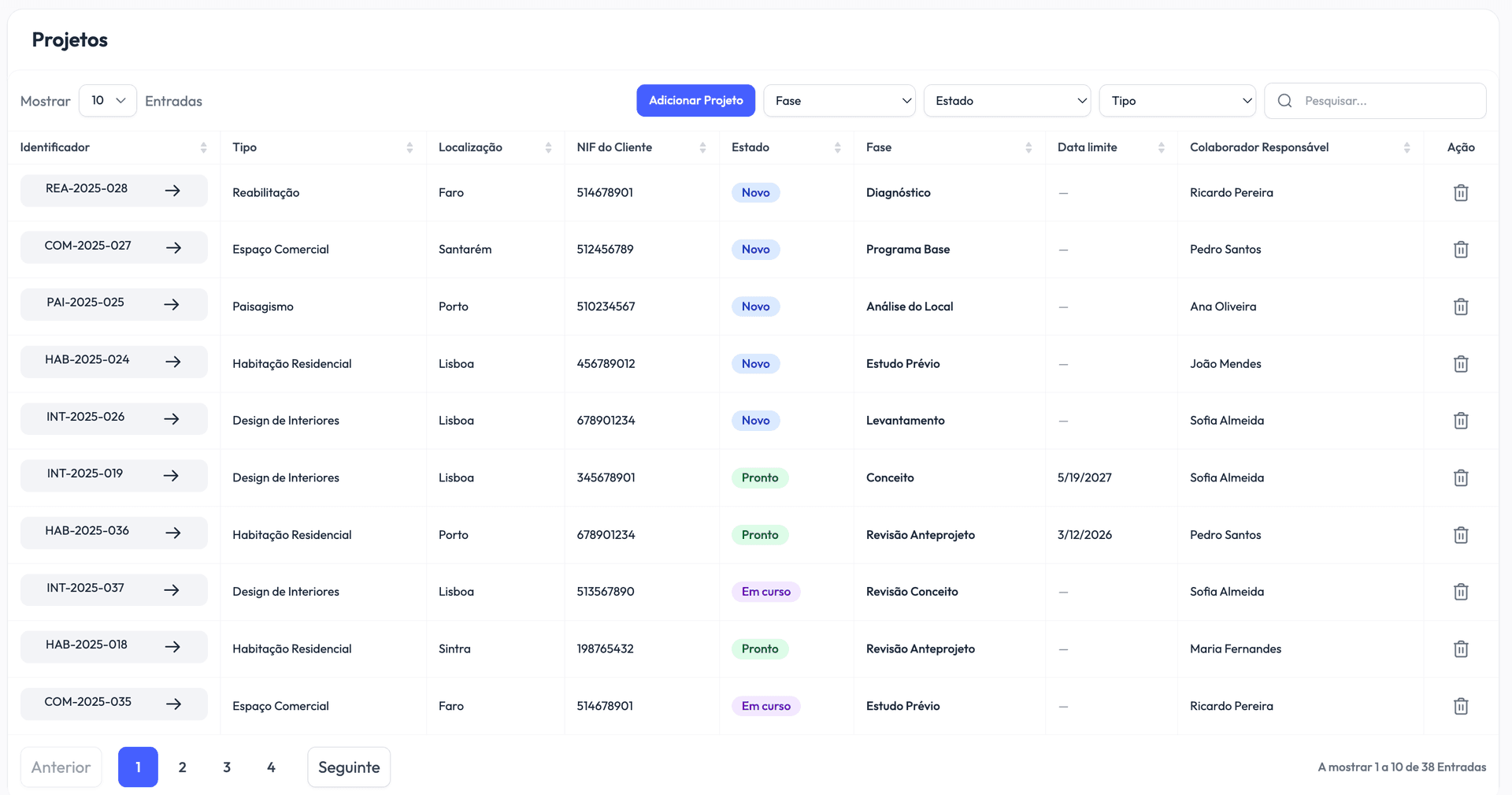
What status should each project have?
Besides its phase, each project needs a simple status that says whether the work can move forward. Five statuses cover almost everything: New, Missing Documentation, Ready, Ongoing and Concluded.
"Missing Documentation" is the most useful status and the most forgotten. A project stuck because the client hasn't sent the land registry certificate or the topographic survey isn't a delay on the firm's side — and it should show as such. Separating the status (can it move?) from the phase (where is it in the method?) is what lets you answer "why isn't this moving?" in seconds.
Phases only make sense while the project is Ongoing: that's when the team records which phase it's in, and every change is dated. That history is the raw material for understanding how long each phase really takes.
What do you do when the client changes their mind mid-phase?
Record the decision, go back to the phase it affects and treat the new deliverable as a new submission. Programme changes are normal in architecture; what goes wrong is when they only live in the memory of whoever took the call.
In practice: the client's request is written down, with a date; if the change reopens a phase that was already closed — an approved preliminary study that turns out to change — the project records that return, and the phase history shows how much time the change cost; and the revised files come in as a new submission, which the client approves again. Months later, when someone asks why the draft project took twice as long, the answer is in the project itself.
Who is responsible for each project?
Every project should have one responsible person — not "everyone". They keep the status and phase current and answer when someone asks about the project. That doesn't stop others from contributing; it stops the project from having no owner when work gets busy.
Around that person, the team needs a few simple rules:
- The whole team sees every project. Company-wide visibility avoids the constant "can you share that with me?" and lets someone cover for a colleague on holiday without losing the thread. What differs between people is what they can manage, not what they can see. See the roles and permissions structure.
- Explicit approvals. "We agreed on the phone" isn't a record. Important deliverables should be reviewed and approved with a date, an author and a note — especially the ones going to the client or the municipality.
- Deadlines everyone can see. One due date per project, and overdue projects flagged in the list, before the Monday meeting rather than after it.
How do you track deadlines without status meetings?
Put the dates in the same place as the projects and let the system show what needs attention. When each project's status, phase and due date sit in one list, the weekly meeting stops being about collecting information and becomes about making decisions.
Three habits help:
- A due date on every project. Even a provisional one. A project with no date is never late — and that's exactly the problem.
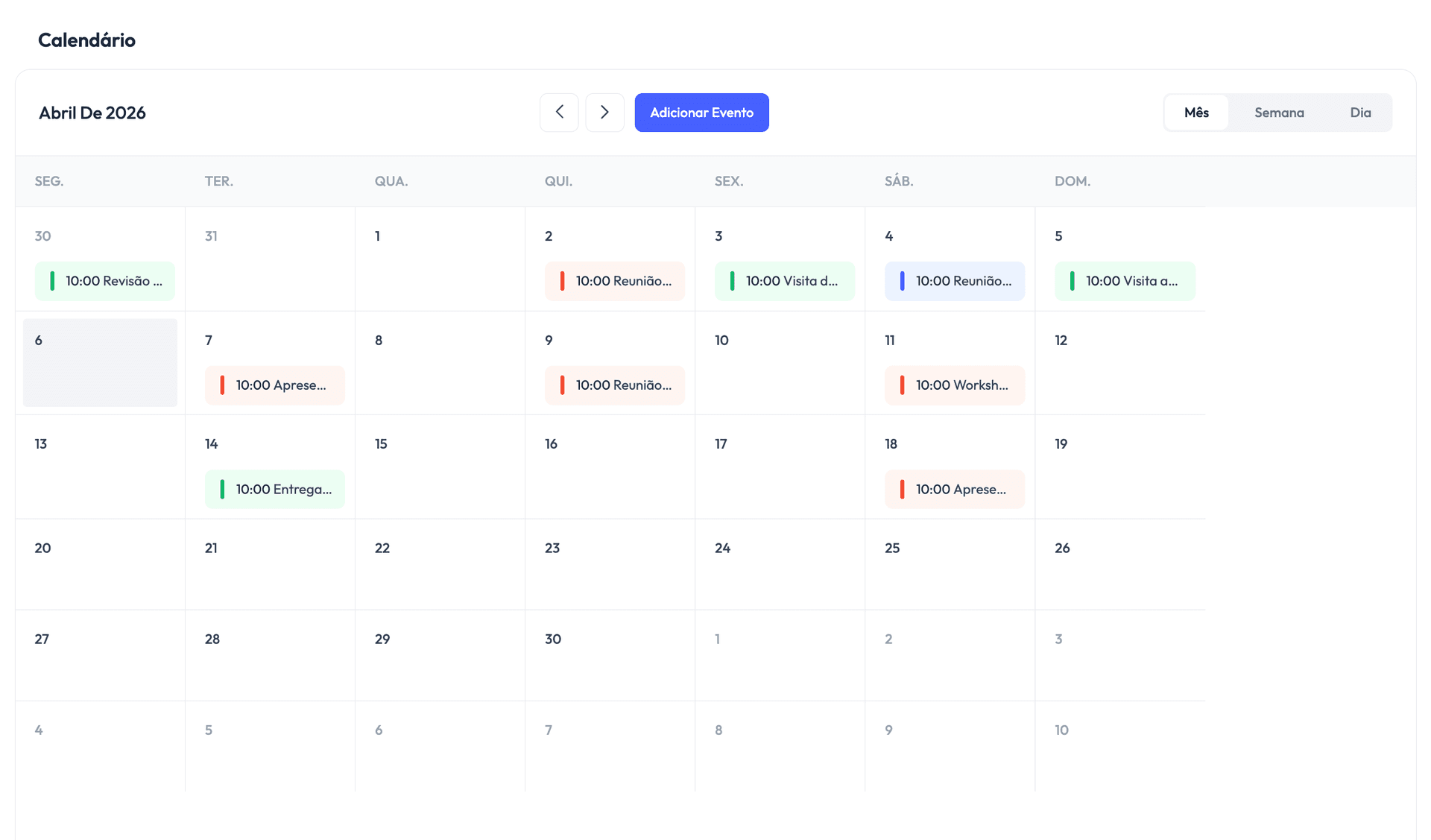
- A shared calendar. Client meetings, site visits and delivery deadlines in one calendar, linked to the project they belong to. Whoever opens the project sees its events; whoever opens the calendar sees the whole firm's week.
- A daily summary. Today's events, upcoming deadlines and overdue ones, on one screen when you start the day.
Where should each phase's files live?
Deliverables should be tied to the phase they belong to, with a folder per phase and naming rules the whole team follows. That way, finding what was submitted for permitting doesn't depend on the memory of whoever submitted it.
Two rules make the biggest difference: each new version of a deliverable is a new file, in a new submission, with the earlier ones kept alongside their review history; and documents that don't belong to a phase — engineering disciplines, studies, client documents — live in their own folders, not scattered across emails. We wrote a dedicated guide on how to organise CAD files in an architecture firm, covering folder structure, naming and external references.
How do you keep the client informed without hours on the phone?
Give the client one place to see where their project stands and approve what concerns them. When the client follows the phases and approves each file with a note that stays on record, the "where are we?" calls drop off and decisions stop getting lost in email.
The critical part is the approval: it should be file by file, with a date and a comment, so that months later everyone knows exactly what was approved. We go deeper in client portals for architecture firms, including an update template you can copy.
Spreadsheet or dedicated software: when should you switch?
Switch when the spreadsheet can no longer answer everyday questions without extra work. Almost every firm starts with a spreadsheet — and it works, until it doesn't. The classic signs that the informal method has run its course:
- The "project status" sheet is out of date by the time it's presented.
- Finding the right version of a file takes longer than working on it.
- Someone goes on holiday and a project becomes unreadable for everyone else.
- The client calls to ask for an update — and answering takes three internal phone calls.
At that point, choosing the right tool has a direct impact on the hours your firm can bill. We compared the most common options in our comparison of the best management software for architects, including when Vellum isn't the best choice.
How do you know the system is working?
Measure three things every month: how long each phase takes against plan, how many deliveries miss their date and where projects get stuck. You don't need separate reports — if the team records statuses, phases and dates, the numbers come out of the work itself.
Questions for the monthly review:
- Which phase consistently runs over its expected duration? Is the model wrong, or the process?
- Are the delays concentrated in one project type, one client or one office?
- How many projects are in Missing Documentation or waiting on the client's review — and for how long?
In Vellum, the statistics use that same data: Core compares each phase's actual duration with the expected one on concluded projects, and Professional adds each phase's average duration, delivery delays and stuck projects.
Checklist: get set up in 30 days
A management system isn't set up over a weekend, but it doesn't need a quarter either:
- Week 1 — model. Define your project types and your firm's real phases, with each one's expected duration. Don't copy someone else's templates: copy your own process.
- Week 2 — bring in what's active. Only ongoing projects, with their current status and phase from day one. The archive can wait.
- Week 3 — bring in the team. Each employee creates their account and joins the team; agree on one rule: if it isn't on the platform, it doesn't exist.
- Week 4 — involve clients. Give one or two receptive clients portal access, gather their reactions, then widen it.
By the end of the month, "where does project X stand?" should take ten seconds to answer, without interrupting anyone. If you want to follow this path in Vellum Architecture, the getting started guide walks through these steps — and you can start free while you model your first project type.